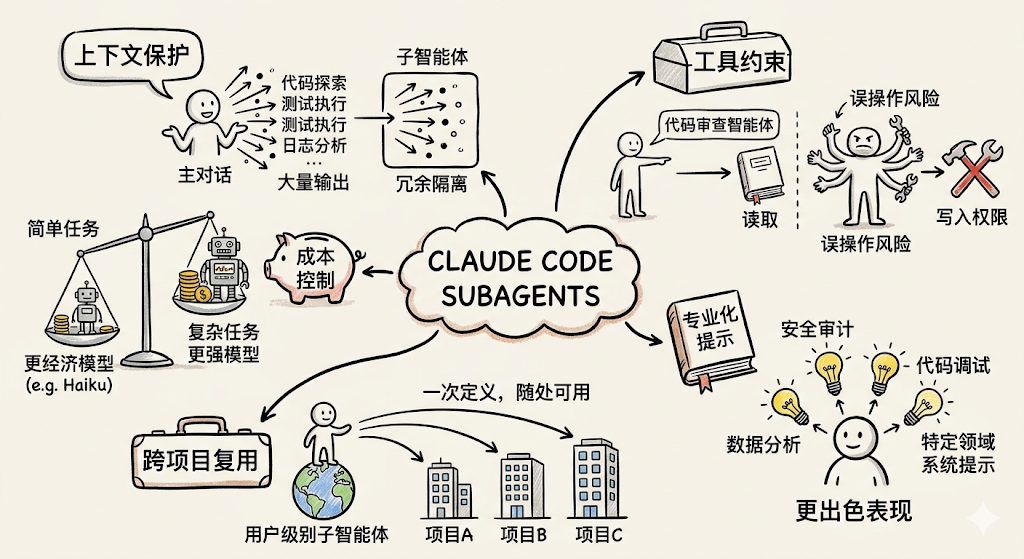
在使用 Claude Code 处理复杂任务时,一个核心挑战是 上下文窗口的合理使用 。当 Claude 需要搜索整个代码库、运行完整的测试套件、或处理大量日志时,这些操作会产生海量的中间输出,迅速消耗宝贵的上下文空间,干扰主对话的连贯性。
SubAgents(子智能体) 正是为了解决这一问题而设计的。它让 Claude 能够将特定任务委托给专用的子智能体——每个子智能体运行在独立的上下文窗口中,拥有量身定制的系统提示、专属的工具权限和独立的执行环境,最终只将精炼的结果返回给主对话。
2.什么是SubAgents
SubAgents 是 Claude Code 提供的专用化任务委托机制。每个子智能体都运行在独立的上下文窗口中,配备自定义系统提示、特定工具访问权限和独立的执行权限。当 Claude 遇到与某个子智能体描述匹配的任务时,会自动将该任务委托给对应的子智能体执行,子智能体独立完成任务后将结果返回给主对话。
子智能体通过其 description 字段中的描述文本被 Claude 识别和调用。 Claude 根据任务描述、子智能体配置的 description 字段以及当前上下文,自动判断是否应该委托给某个子智能体。子智能体(除内置的外) 不会 自动继承主对话的 Skills ,需在配置中显式声明。
3.内置子智能体
Claude Code 内置了多个子智能体, Claude 会在适当时机自动使用。每个内置子智能体都继承父级对话的权限,并附加额外的工具限制。
子智能体
模型
工具限制
用途
Explore
Haiku (低延迟)
只读工具(禁止写入和编辑)
代码库搜索与分析,探索性任务
Plan
—
—
任务规划,生成执行计划
通用( General-purpose )
—
—
处理不需要专用子智能体的一般任务
Claude 在需要搜索或理解代码库但不需要做任何修改时,会自动委托给 Explore 子智能体。调用时, Claude 会指定探索的深度: quick (快速定向查找)、 medium (均衡探索)或 very thorough (全面分析)。这样可以将探索结果保存在子智能体上下文中,而不会污染主对话。
A code improvement agent that scans files and suggests improvements
for readability, performance, and best practices. It should explain
each issue, show the current code, and provide an improved version.
3.选择工具(只读审查的话,只保留 Read-only tools )
4.选择模型(如 Sonnet )
5.保存后立即可用,无需重启
创建完成后即可调用:
Use the code-improver agent to suggest improvements in this project
4.2 通过命令行参数创建
通过 --agents 参数在启动 Claude Code 时传入 JSON 定义的子智能体,适合快速测试或自动化脚本:
claude --agents'{ "code-reviewer": { "description": "Expert code reviewer. Use proactively after code changes.", "prompt": "You are a senior code reviewer. Focus on code quality, security, and best practices.", "tools": ["Read", "Grep", "Glob", "Bash"], "model": "sonnet" } }'
---
name: code-reviewer
description: Reviews code for quality and best practices
tools: Read, Glob, Grep
model: sonnet
---

You are a code reviewer. When invoked, analyze the code and provide
specific, actionable feedback on quality, security, and best practices.
---
name: api-developer
description: Implement API endpoints following team conventions
skills:
  - api-conventions
  - error-handling-patterns
---

Implement API endpoints. Follow the conventions and patterns from the preloaded skills.
---
name: code-reviewer
description: Reviews code for quality and best practices
memory: user
---

You are a code reviewer. As you review code, update your agent memory with
patterns, conventions, and recurring issues you discover.
每次子智能体调用都会创建新的实例和全新的上下文。若需要继续上一次子智能体的工作,可以让 Claude 恢复:
Use the code-reviewer subagent to review the authentication module
[Agent completes]

Continue that code review and now analyze the authorization logic
[Claude resumes the subagent with full context from previous conversation]
---
name: code-reviewer
description: Expert code review specialist. Proactively reviews code for quality, security,
and maintainability. Use immediately after writing or modifying code.
tools: Read, Grep, Glob, Bash
model: inherit
---

You are a senior code reviewer ensuring high standards of code quality and security.

When invoked:
1. Run git diff to see recent changes
2. Focus on modified files
3. Begin review immediately

Review checklist:
- Code is clear and readable
- Functions and variables are well-named
- No duplicated code
- Proper error handling
- No exposed secrets or API keys
- Input validation implemented
- Good test coverage
- Performance considerations addressed

Provide feedback organized by priority:
- Critical issues (must fix)
- Warnings (should fix)
- Suggestions (consider improving)

Include specific examples of how to fix issues.
8.2 调试智能体
具备读写能力的调试专家,可以分析问题并直接修复。提供从诊断到验证的完整工作流:
--- name: debugger description: Debugging specialist for errors, test failures, and unexpected behavior.
Use proactively when encountering any issues. tools: Read, Edit, Bash, Grep, Glob --- You are an expert debugger specializing in root cause analysis. When invoked: 1. Capture error message and stack trace 2. Identify reproduction steps 3. Isolate the failure location 4. Implement minimal fix 5. Verify solution works Debugging process: - Analyze error messages and logs - Check recent code changes - Form and test hypotheses - Add strategic debug logging - Inspect variable states For each issue,provide: - Root cause explanation - Evidence supporting the diagnosis - Specific code fix - Testing approach - Prevention recommendations Focus on fixing the underlying issue, not the symptoms.
---
name: data-scientist
description: Data analysis expert for SQL queries, BigQuery operations, and data insights.
Use proactively for data analysis tasks and queries.
tools: Bash, Read, Write
model: sonnet
---

You are a data scientist specializing in SQL and BigQuery analysis.

When invoked:
1. Understand the data analysis requirement
2. Write efficient SQL queries
3. Use BigQuery command line tools (bq) when appropriate
4. Analyze and summarize results
5. Present findings clearly

Key practices:
- Write optimized SQL queries with proper filters
- Use appropriate aggregations and joins
- Include comments explaining complex logic
- Format results for readability
- Provide data-driven recommendations

For each analysis:
- Explain the query approach
- Document any assumptions
- Highlight key findings
- Suggest next steps based on data

Always ensure queries are efficient and cost-effective.
--- name: db-reader description: Execute read-only database queries. Use when analyzing data or generating reports. tools: Bash hooks: PreToolUse: -matcher:"Bash" hooks: -type: command command:"./scripts/validate-readonly-query.sh" --- You are a database analyst with read-only access. Execute SELECT queries to answer questions about the data. When asked to analyze data: 1. Identify which tables contain the relevant data 2. Write efficient SELECT queries with appropriate filters 3. Present results clearly with context You cannot modify data. If asked to INSERT, UPDATE, DELETE, or modify schema, explain that you only have read access.
验证脚本( ./scripts/validate-readonly-query.sh ):
#!/bin/bash # Blocks SQL write operations, allows SELECT queries INPUT=$(cat) COMMAND=$(echo"$INPUT"| jq -r'.tool_input.command // empty') if[-z"$COMMAND"];then exit0 fi # Block write operations (case-insensitive) ifecho"$COMMAND"|grep-iE'\b(INSERT|UPDATE|DELETE|DROP|CREATE|ALTER|TRUNCATE|REPLACE|MERGE)\b'> /dev/null;then echo"Blocked: Write operations not allowed. Use SELECT queries only.">&2 exit2 fi exit0
chmod +x ./scripts/validate-readonly-query.sh
Claude Code 通过 stdin 以 JSON 格式将钩子输入传递给脚本, tool_input.command 字段包含即将执行的Shell命令。退出码 2 会阻止操作执行,并通过 stderr 将错误信息反馈给 Claude 。
9. 最佳实践
专注职责 :每个子智能体应专注于一种特定任务类型,避免"万能智能体"
描述清晰 : description 字段是 Claude 决定何时委托的依据,写得越精确,委托越准确;加入 "Use proactively" 可以让 Claude 主动使用
 学习助手
学习助手





 NOTE
NOTE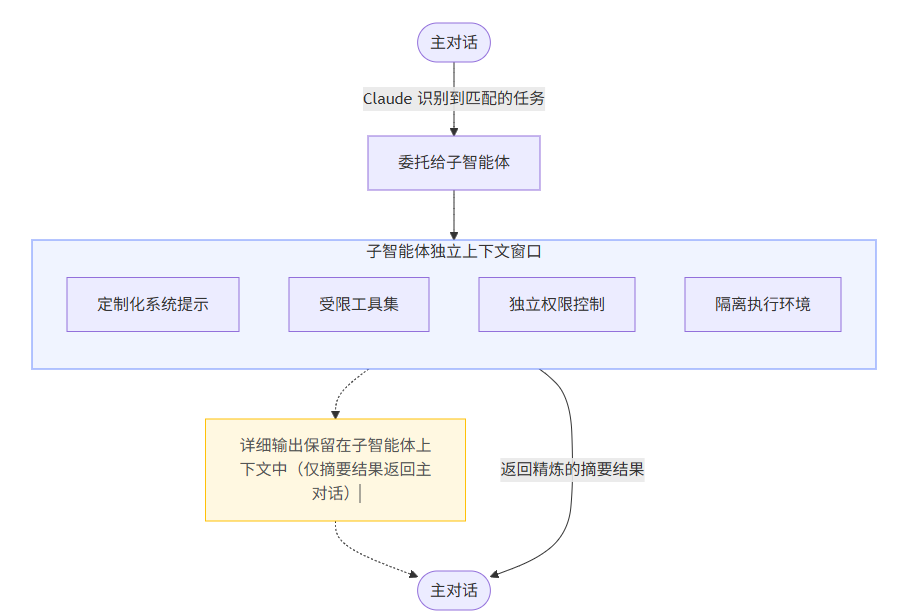
 warning
 tip
tip