LLM 推理服务的扩缩容不是简单的 "CPU 高了就加 Pod",而是需要感知 GPU 显存、队列深度和模型加载时间的智能调度。
核心概念(含架构图)
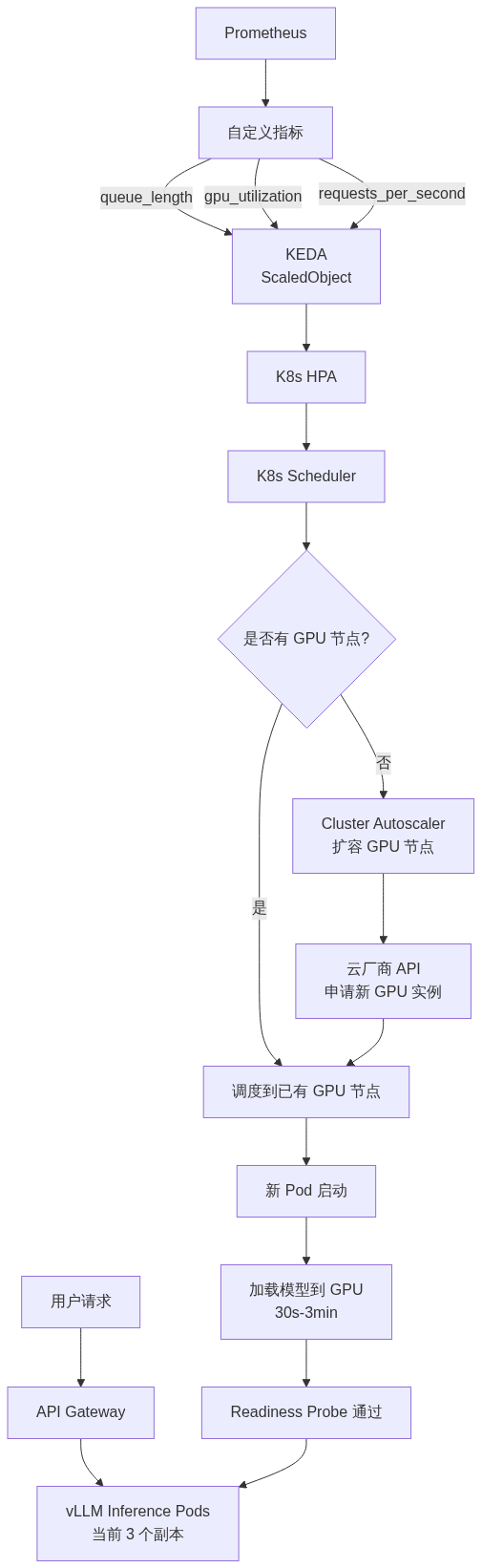
HPA + KEDA 自动扩缩架构
这张图揭示了 LLM 扩缩容的核心难点:从触发扩容到 Pod 能处理请求,中间有 30s-3min 的模型加载时间,这是传统 HPA 无法解决的。
部署视角
HPA 基础与局限性
标准 HPA(基于 CPU)
apiVersion: autoscaling/v2kind: HorizontalPodAutoscalermetadata: name: vllm-hpaspec: scaleTargetRef: apiVersion: apps/v1 kind: Deployment name: vllm-llm minReplicas: 2 maxReplicas: 10 metrics: - type: Resource resource: name: cpu target: type: Utilization averageUtilization: 70
为什么标准 HPA 不适合 LLM 推理?
基于自定义指标的 HPA
apiVersion: autoscaling/v2kind: HorizontalPodAutoscalermetadata: name: vllm-hpa-customspec: scaleTargetRef: apiVersion: apps/v1 kind: Deployment name: vllm-llm minReplicas: 2 maxReplicas: 10 metrics: # GPU 利用率指标 - type: Pods pods: metric: name: gpu_utilization_percent target: type: AverageValue averageValue: "80" # 请求队列长度 - type: Pods pods: metric: name: vllm_queue_length target: type: AverageValue averageValue: "16"
KEDA(Kubernetes Event-driven Autoscaling)
KEDA 是对 HPA 的增强,支持更多触发器和更灵活的扩缩策略。
apiVersion: keda.sh/v1alpha1kind: ScaledObjectmetadata: name: vllm-scaling namespace: llm-servingspec: scaleTargetRef: name: vllm-llm pollingInterval: 15 # 每 15 秒检查一次指标 cooldownPeriod: 300 # 缩容冷却 5 分钟(避免抖动) minReplicaCount: 2 # 始终保留 2 个副本 maxReplicaCount: 20 advanced: horizontalPodAutoscalerConfig: behavior: scaleUp: stabilizationWindowSeconds: 60 # 扩缩稳定窗口 policies: - type: Pods value: 2 # 每次最多加 2 个 Pod periodSeconds: 60 scaleDown: stabilizationWindowSeconds: 600 # 缩容更保守(10 分钟) policies: - type: Pods value: 1 # 每次只缩 1 个 Pod periodSeconds: 120 triggers: # Prometheus 指标触发 - type: prometheus metadata: serverAddress: http://prometheus.monitoring:9090 query: avg_over_time(vllm_num_requests_waiting{namespace="llm-serving"}[2m]) threshold: "10" # 排队请求超过 10 个开始扩容 # GPU 利用率触发 - type: prometheus metadata: serverAddress: http://prometheus.monitoring:9090 query: avg(DCGM_FI_DEV_GPU_UTIL{namespace="llm-serving"}) threshold: "85" # GPU 利用率超过 85% 扩容
自定义指标扩缩详解
关键指标选型
GPU 感知扩缩策略
# 自定义 Metrics Adapter 示例(Prometheus Adapter 配置)rules: - seriesQuery: 'vllm_gpu_cache_usage_ratio{namespace!="",pod!=""}' resources: overrides: namespace: {resource: "namespace"} pod: {resource: "pod"} name: matches: "vllm_gpu_cache_usage_ratio" metricsQuery: 'avg by(pod) (rate(vllm_gpu_cache_usage_ratio[2m]))'
GPU 扩缩的特殊性:一个 GPU 能同时服务多少请求取决于模型大小和 KV Cache 配置:
冷启动问题深度分析
冷启动时间分解:
总耗时约 80 秒,在这期间用户请求排队或超时。
冷启动缓解方案
# Warm Pool 实现:使用 KEDA 保持最小副本 + Cluster Autoscaler 预 provision# 策略:始终保持 minReplicaCount = 2# 即使用户请求为 0,也保留 2 个已加载模型的 Pod# 预测性扩容实现:KEDA Cron Scaler triggers: - type: cron metadata: timezone: Asia/Shanghai start: 0 9 * * * # 每天 9:00 开始 end: 0 10 * * * # 每天 10:00 结束 desiredReplicas: "8" # 早高峰扩容到 8 个
弹性缩容的优雅处理
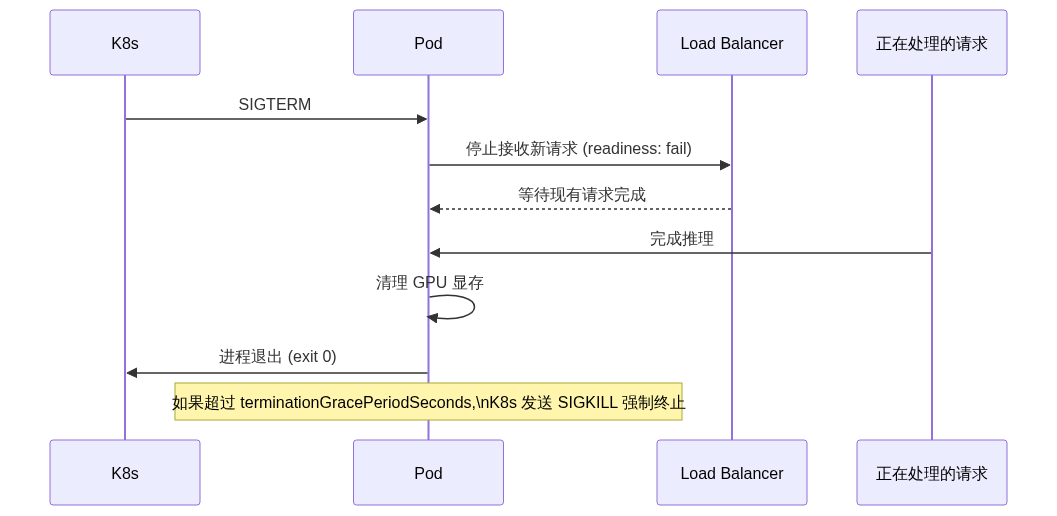
Graceful Shutdown 流程
spec:
  template:
    spec:
      terminationGracePeriodSeconds: 120  # 给 2 分钟完成优雅退出
      containers:
      - name: vllm
        lifecycle:
          preStop:
            exec:
              command:
              - /bin/sh
              - -c
              - |
                # 1. 通知 LB 停止分发流量
                sleep 10
                # 2. 等待正在处理的请求完成
                # 3. 清理 GPU 资源
                curl -X POST http://localhost:8000/shutdown
关键配置:
面试视角
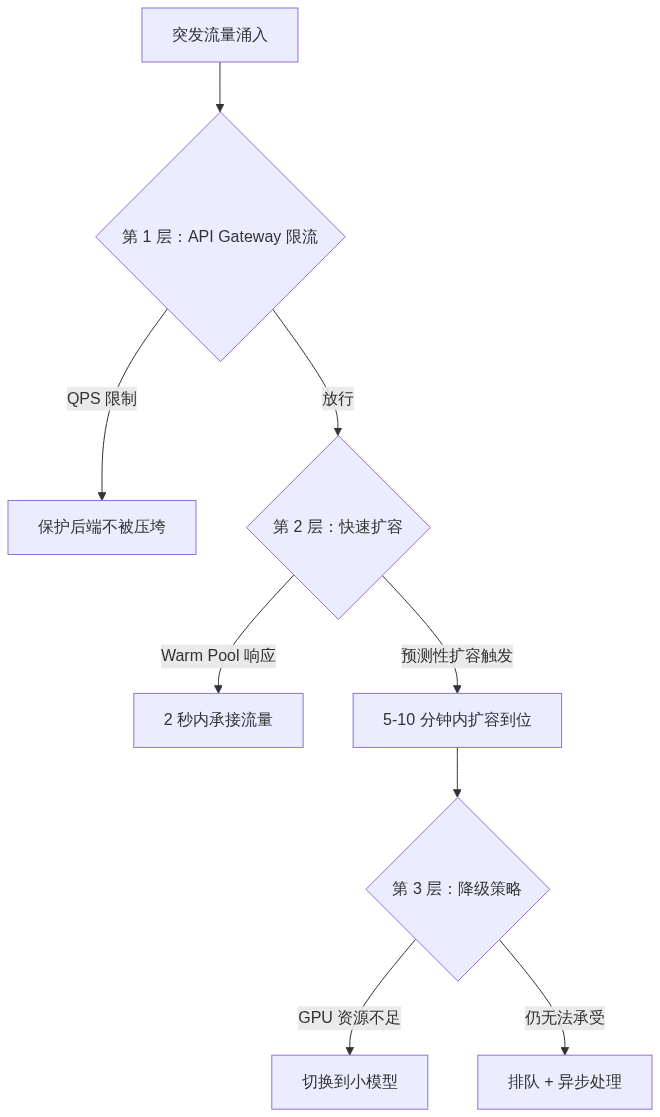
面试题:LLM 服务突发流量(如产品上线、热点事件),如何处理?
标准答案(分三层防御):
详细策略:
关键追问:
Q: 如果流量突增 10 倍,扩容来不及怎么办?
A:
Q: 缩容时如何判断一个 Pod 是否可以安全缩掉?
 学习助手
学习助手